Opt-out of SEAS email lists
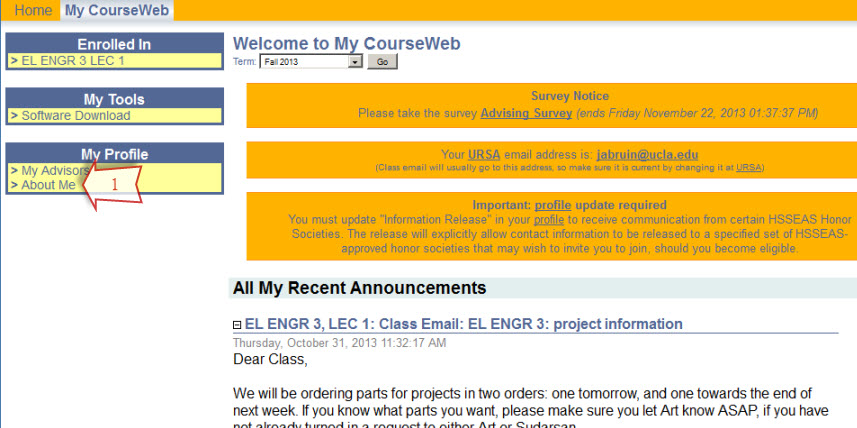
- Login to MyEngineering and go to "MyEngineering" tab if you're not there already.
- In "My Profile" block, click "About Me".
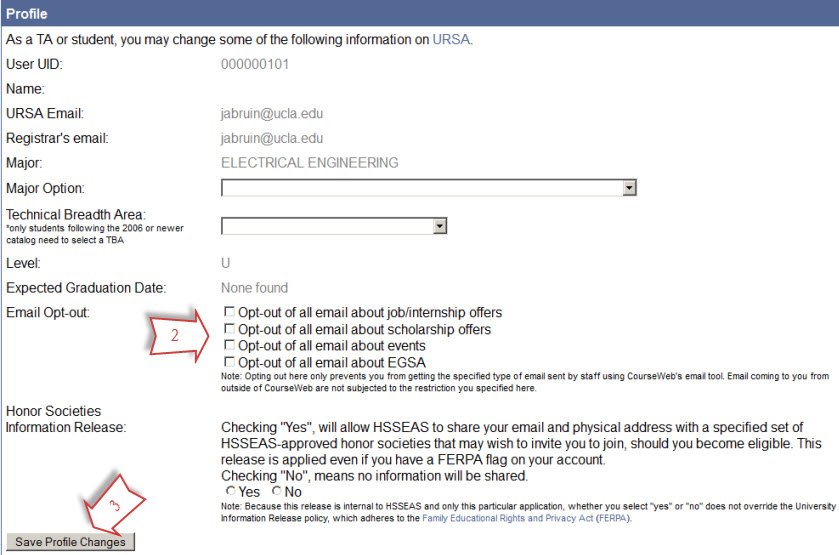
- Check one or more of the options.
- Click the "Save Profile Changes" button.
Related Articles
How to Change My Email in BruinLearn
Go to Account > Settings > Email Addresses (on the far-right) Select "+ Email Address" Enter your preferred email An email will send to the preferred email. Confirm the address. Go back to the email addresses list in BruinLearn and change the default ...
Email features, how-to and policy
Please visit https://help.seas.ucla.edu/portal/en/kb/articles/group-email-lists.
Adding the UCLA Samueli Logo to Your Email Signature
To ensure the UCLA Samueli logo displays correctly in your email signature, it is best to host the image in an accessible online location. The logo is available at: ...
Group Email Aliases and Communication Guide
Two Types of Email Aliases EA Email Aliases (@ea.ucla.edu) Google Groups (@seas.ucla.edu) Automatically generated Require active, ongoing maintenance by their owners Data-driven from Student Information System (SIS), UCPath and Campus Directory Not ...
IT Resources for MSOL
Login: UCLA Logon IDWhere to get help: accounts.iam.ucla.edu or contact UCLA IT Services You will use your UCLA Logon ID to access the following resources: Bruin Learn for class websites Zoom for online office hours ScheduleIt for studio reservations ...